ARworks · Healthcare portfolio

See inside the body. Practise without risk.

VR simulation, AR explanation, mobile apps and AI instructors for healthcare training, patient information and institutional processes — since 2011.

HEART RATE72bpm
SpO₂98%
BLOOD PRESSURE118/76mmHg
RESP. RATE14/min
years of interactive 3D and VR/AR development
15
completed healthcare and pharma references
13
video presentations, one click to play
18
platforms: VR · AR · mobile · AI
4
Brands and partners
  • Novartis
  • Boehringer Ingelheim
  • Teva
  • AbbVie
  • Pfizer
  • Bayer
  • Medtronic
  • Control-X
  • TrustAir
  • OKFŐ
  • NATO CoE MilMed
  • VIKI
  • Doktor24

01 — Why ARworks

Three situations where technology helps.

Practising, understanding, finding your way — we have built answers to these since 2011.

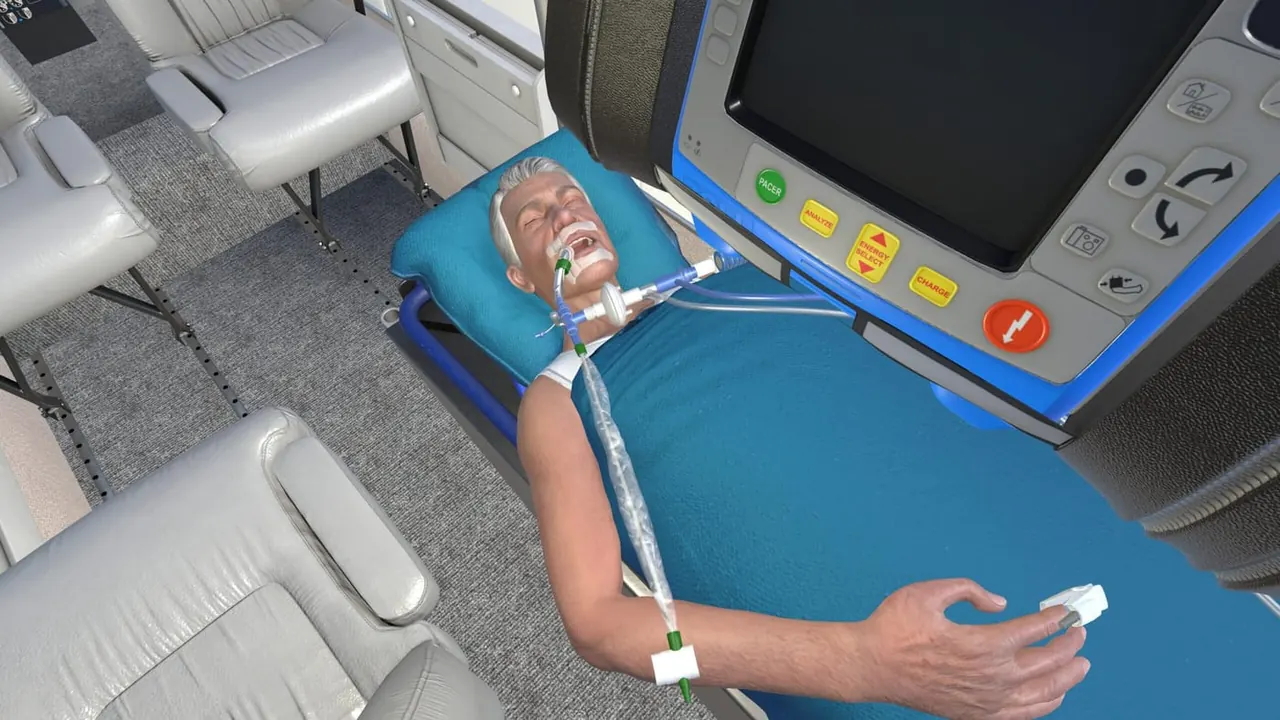
The virtual patient on the stretcher in the VR simulator, with the patient monitor beside
01

How do I practise without risk?

Rare, dangerous situations — in a safe, repeatable virtual environment.

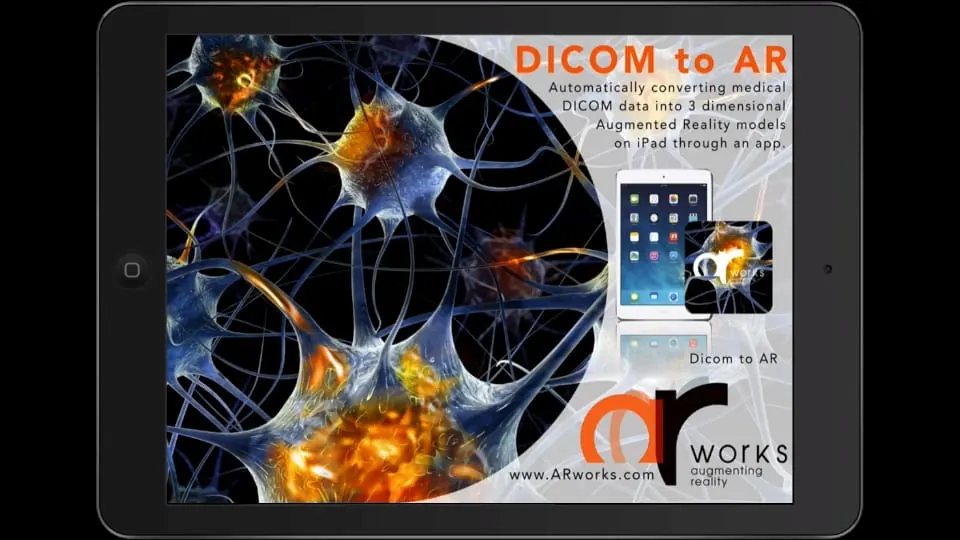
A 3D AR model made from DICOM data on an iPad, above a poster
02

How do I understand what happens in the body?

The mechanism of action and the course of a disease, seen in space, from the inside.
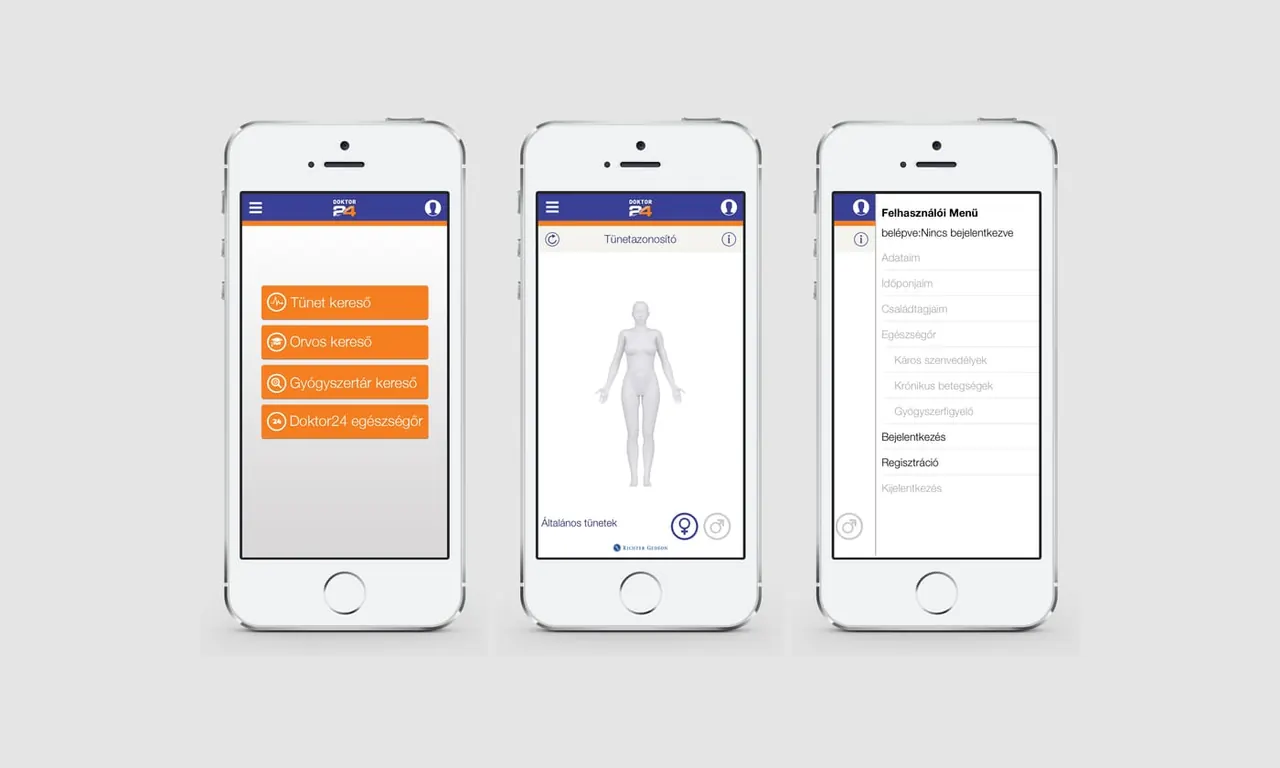
Three phones with a body figure and a map — a healthcare application
03

How do I find my way quickly?

An askable kiosk, a mobile app and access control — from the institution’s own material.

02 — References

Delivered and presented work

Click a card: details, video, ARworks’ role.

  • Referencea completed, delivered project
  • Demoour own demo or work in development
  • Directiona recommendable solution built on existing know-how
  • Own producta finished ARworks product or platform

Brand names refer to completed projects, not to a current contract.
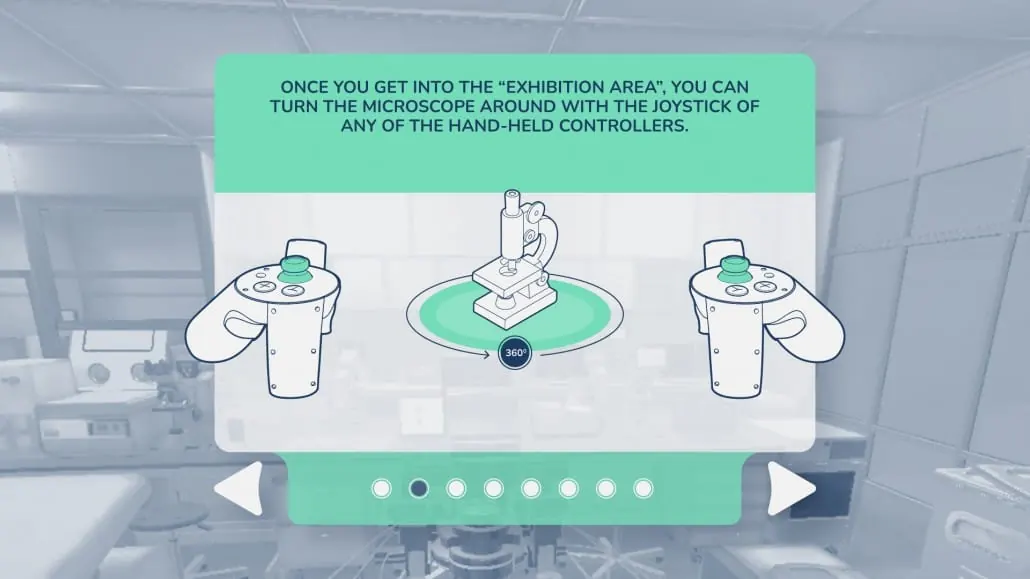
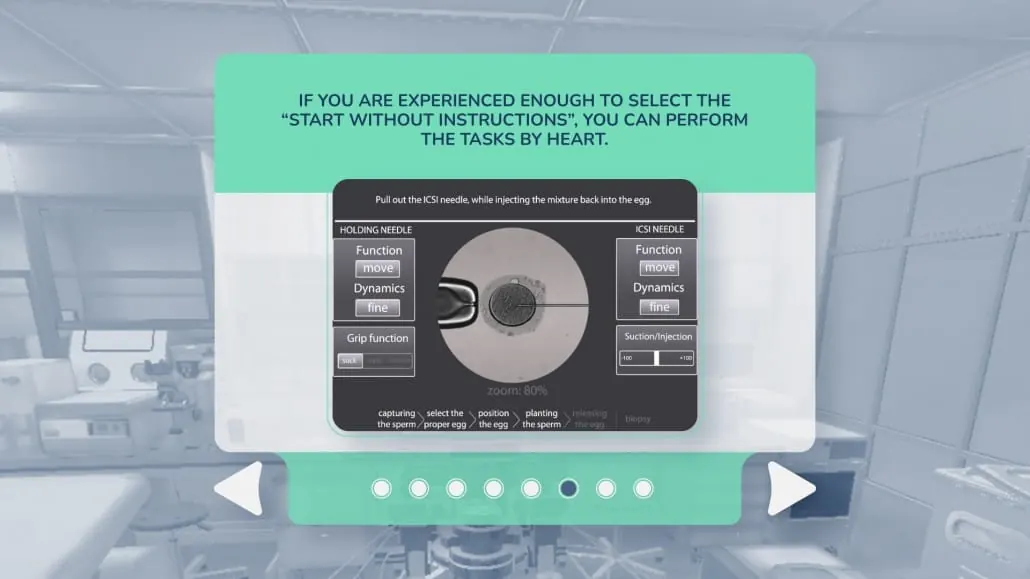
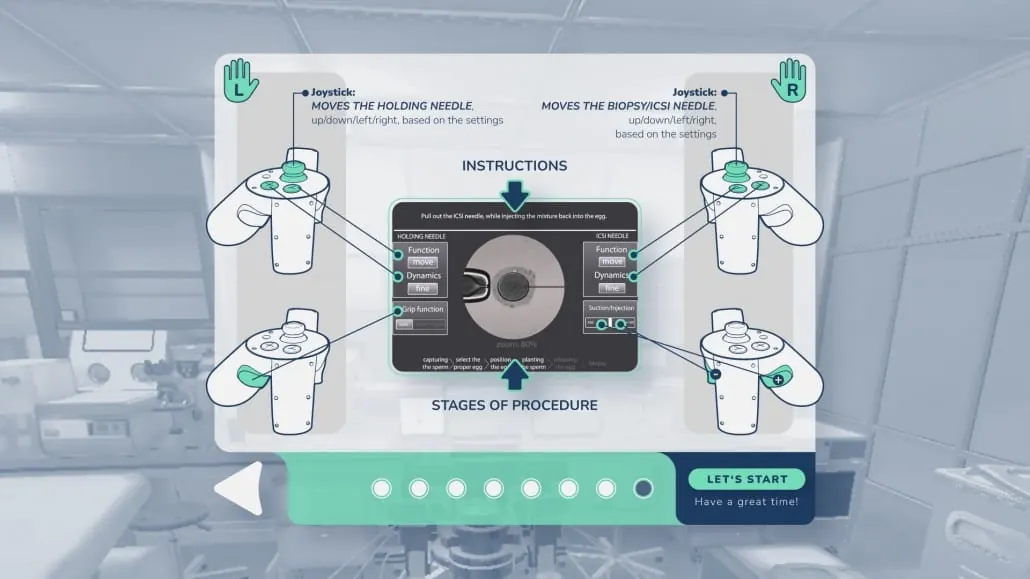
Guide: the microscope can be turned with the controllers’ joysticksThe steps of the tutorial and starting without instructionsThe diagram of the controllers and controlsThe procedure screen with the microscope view and two needles

In use

How they practise: the IVF SimPro simulator

The real application’s screens — with the touches.

Training and simulation

VR training · simulation

Safe, repeatable practice — with measurable results.

  • VR training
  • Patient care
  • Device use
  • AI trainer
72bpm 98 Illustration OKFŐ Reference

Safe practice, in Hungarian and English

Practising basic nursing knowledge and procedures in a virtual environment.

  • VR training
  • Nursing
A rescue helicopter by the lake on the start screen of the VR simulator Medtronic · 2025 Reference

Video laryngoscope, with AI-supported patients

A VR simulator to practise using the video laryngoscope and the patient-care process.

  • VR · AI
  • Video laryngoscope
The virtual patient lying in the aircraft cabin, with a patient monitor TrustAir · 2023 Reference

Emergency patient care on board

Practising air patient transport and emergency care situations in VR, with an AI trainer.

  • VR · AI
  • Air patient transport
A patient monitor and defibrillator in the helicopter cabin VIKI · 2024 Reference

Rescue, battlefield care, equipment familiarisation

Helicopter patient transport, battlefield casualty care and equipment familiarisation in VR and interactive 3D.

  • VR training
  • Military medicine
The virtual 3D training centre of NATO CoE MilMed (video thumbnail) NATO CoE MilMed Demo

A virtual 3D training centre in the browser

A browser-based 3D training that teaches the use of an AED device.

In development.

  • Browser 3D
  • AED training
A VR profession simulator: laboratory tasks (video thumbnail) MKIK · 2018 Reference

Laboratory tasks, virtually

A VR profession simulator showing lab technician tasks and workflows.

  • VR simulator
  • Lab technician

Patient information and pharma

AR · VR · mobile

The body and the mechanism of action become visible; daily follow-up becomes simple.
  • Mechanism of action
  • Symptom diary
  • Education
  • Accessible
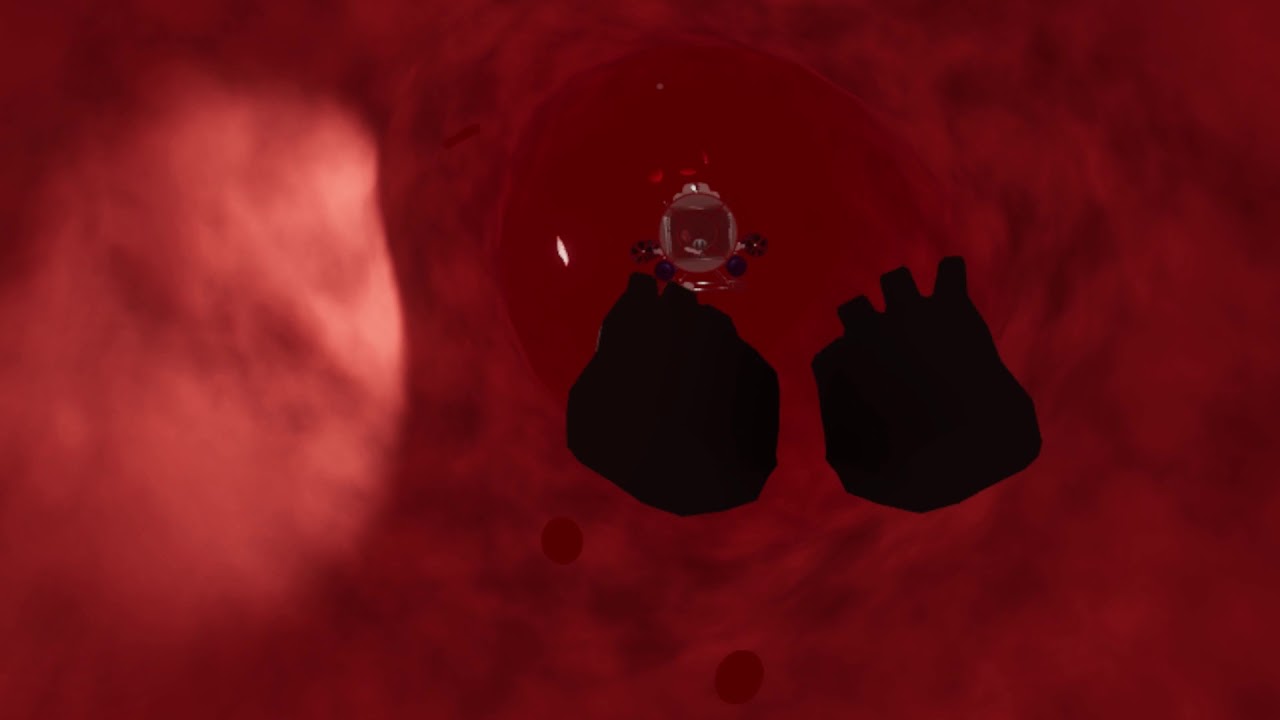
A VR journey through the vascular system (video thumbnail) Xarelto Reference

The mechanism of action from the inside

A VR experience showing the product’s mechanism of action and the physiological processes.

  • VR
  • Mechanism of action
An AR hand in X-ray view with the joints highlighted (video thumbnail) AbbVie Reference

The joints, in 3D, on the hand

An AR-based illustration of the course of the disease and its effect on the joints.

  • AR
  • Rheumatoid arthritis
The diary’s home screen: today and events, on the phone Novartis ITP · 2019 Reference

A multilingual symptom and condition tracking app

A mobile application supporting regular recording and follow-up of patients’ symptoms.

  • Mobile
  • Symptom diary
Character selection screen: six child characters to choose from AID HERO · 2020 Reference

For young people and their families

A playful mobile app helping people live with a disease — for patients and those around them.

  • Mobile
  • Playful education
A table with VR headsets, phones and a tablet for the presentation Novartis nano Reference

How an active ingredient works, in two experiences

A 360° VR animation and an AR microscope showing how a new active ingredient works.

  • VR · AR
  • Active-ingredient action
The ViaOpta Daily home screen with large colourful buttons: weather, magnifier, timer, contacts, colour, money ViaOpta · 2014 Reference

An everyday helper on the phone

A mobile app that helps the daily life of visually impaired users.

  • Mobile
  • Accessible
Three phones: a menu, a body figure and a list Doktor24 · 2014 Reference

A health service in your pocket

A health service’s mobile and tablet application for iOS and Android.

  • Mobile
  • Mobile doctor

Medical technology and anatomy

Interactive 3D · AR

Equipment and anatomy can be shown without a physical sample.

  • Product presentation
  • DICOM → AR
  • Anatomy
  • Touchscreen
The virtual X-ray room with markers for the main functions and the details panel Control-X · 2023 Reference

The “F” series, without a physical machine

An interactive 3D presentation of a Hungarian-developed X-ray machine: how it works and its main functions can be shown without the physical machine.

  • Touch · 3D
  • X-ray machine
A 3D AR model made from DICOM data on an iPad: medical data appearing over a poster Medical AR · 2014 Demo

Medical data, in space

Our own demo: medical data as a 3D AR model on an iPad, for the medical, pharma and education sectors.

  • AR
  • DICOM → AR
The 3D model of the female internal reproductive organs on the iPad screen, above the real table Medical demo · 2012 Demo

Anatomy in AR, from 2012

A schematic, walk-around 3D model of the female internal reproductive organs in AR, with the position of a contraceptive ring.

  • AR
  • Anatomy
A cutaway 3D model of the eye with muscles and fundus Syringe in the eye · 2012 Demo

How an eye medicine works, in a richly detailed animation

AR showing the mechanism of an eye medicine: an animation of the eye and the injection delivering the agent.

  • AR
  • Eye

Our own platforms

Adaptable foundations

What does not have to be built from zero: faster to adapt to an institution’s task.

A professional with VR controllers, a colleague on a laptop following the exercise IVF SimPro · 2021 Own product

Professionals’ practice, in VR and in the browser

A simulation showing and teaching artificial insemination processes, on a VR headset and on the web.

  • VR + web
  • Reproductive medicine
The TouchAI touchscreen AI kiosk at an exhibition stand (video thumbnail) TouchAI Own product

Information, patient guidance, preparation

A touchscreen-optimised AI assistant and multimedia information platform — from the institution’s own materials.

  • AI kiosk
  • Patient guidance
The VRAI virtual training room with an AI avatar (video thumbnail) VRAI Knowledge Space Demo

Lecturer, consultant and examiner in one avatar

An AI-based virtual lecture and training space for healthcare and medical lectures.

  • AI + VR
  • Training

03 — Toolkit

See what we can build.

Four hands-on tools: monitor, anatomy, measurable practice, symptom diary. Next to each it says what it is for.

Illustrative concept demos with fictional data — not clinical tools.

Concept — demo data

Rest: pulse and saturation in the normal range, the ECG regular.

Heart

At rest it contracts 60–100 times a minute and pumps blood around the body.

Concept — demo data
Layers

Click an organ.

Time0:00Errors0
Concept — demo data

Click the steps in the right order — the timer starts at the first click.

Concept — demo data
Today

Set today’s symptoms: the system flags a lasting worsening.

04 — Surfaces

One professional content base. Every surface.

The same approved content on a VR headset, mobile, touchscreen, browser, in AR and at reception.

VR headset practice in a safe space Details + Mobile · tablet in the patient’s andprofessional’s pocket Details + Touchscreen a device without thephysical machine Details + Browser no installation, fromanywhere Details + AR the body in real space Details + Kiosk ·reception guidance, check-in Details + Shared professionalcontent protocols · stepsanatomy · dataAI knowledge
  1. Shared professional content

    protocols · steps · anatomy · data · AI knowledge

01

Shared content, separate experience

Protocol and anatomy content is managed from one base; in a headset scale matters, on mobile simplicity.

02

Experts validate

We develop the professional content together with the healthcare experts concerned.

03

The same AI everywhere

The AI can use the same approved knowledge on every channel.

05 — AI

Ask. The system guides.

The conversational layer answers from the institution’s own approved material — and shows the way.

TouchAI — patient guide
ReceptionWaitingBlood testsLaboratoryEntranceX-rayCardiologyLift
Concept — demo data
Where are the blood tests, and how do I get there?
Straight from the entrance, left at the end of the corridor: Blood tests, floor 1.
Type or pick…

What the AI layer can do

01Patient guidance and informationRoute, preparation, frequently asked questions — in several languages.

TouchAI takes questions in natural language on a touchscreen kiosk or on mobile, works from documents and content supplied by the institution, and can show text, images or video.

02Virtual instructor and knowledge spaceLecturer, consultant and examiner in one AI avatar.

The AI instructor lectures, answers questions, works from institutional documents and training material, builds practice tasks and adapts the explanation to the knowledge level — on a VR headset, a computer or in the browser.

03AI patient in the simulationThe virtual patient talks and reacts; the trainer is ChatGPT-based.

In the Medtronic and TrustAir trainings an AI-supported patient and a ChatGPT-based trainer support practice. We validate scenarios together with the experts concerned.

04Internal knowledge base and searchProtocols, policies and training material, askable.

The AI answers from the institution’s own documents; the source and the document’s version are tied to the answer. We choose the AI tool according to information-security requirements.

05AI training and consultingTask-based: which method works in the role, safely.

Not a general demonstration of tools, but showing which AI method works efficiently and safely in a given role or process — for managers, IT specialists and administrative staff.

06Quick, targeted developmentsVibe Coding: smaller internal applications and prototypes.

Well-defined internal applications and prototypes in a short time; before development we clarify what data it handles, which systems it connects to and what security environment it can run in.

  1. 01Question
  2. 02Intent
  3. 03Verified source
  4. 04Answer and route

Routes · information sheets · appointments — from the institution’s own data

The language model interprets; content and action come from the institution’s system.

Working AI solutions — in the field

  • VRAI Knowledge SpaceAn AI lecturer, consultant and examiner avatar with an AR view.
  • TrustAirA VR training with a ChatGPT-based trainer for air patient transport.
  • MedtronicThe McGRATH VR simulator with AI-supported patients.
  • TouchAIAn AI kiosk working live at a trade show.

Healthcare AI functions are development directions: in a specific institutional system they are not references as finished installations.

06 — Access

Arrival. Orderly, fast.

TabLog is ARworks’ ready access product: visitors and staff, from a tablet, a phone, the cloud.

A guest’s journey

  1. 01Invitation and QR codeThe guest registers in advance.
  2. 02ArrivalFrom a phone or tablet.
  3. 03NotificationThe host is notified at once.
  4. 04EntryThe door or turnstile opens by permission.
  • Cloud-based administration
  • Turnstile control
  • Institution-specific configuration
Welcome CHECK IN Illustration TabLog Visitor Own product

Invitation, QR code, instant notification

Visitors’ advance registration and QR-code check-in from a tablet or phone.

  • Access
  • QR code
LOCAL UNIT CLOUD Illustration TabLog Access Own product

A door or turnstile that opens by permission

Managing staff and guest entries, turnstile control and links to door-opening systems.

  • Door opening
  • Turnstile

Its applicability in hospitals is examined after surveying current processes, security requirements and existing hardware.

07 — Since 2011

A heartbeat since 2011.

From the first medical AR demo to the AI instructor — on one line, every milestone a peak.

08 — Packages

Healthcare packages we can put together

Eight packages — backed by delivered work. Click a tile.

How we work

  1. 01

    Professional discussion

    The goal and the experts: what must be practised or understood, and who approves the content.

  2. 02

    Scenario and prototype

    Steps, situations and the indicators to measure; an early prototype for the experts.

  3. 03

    Development and testing

    VR, AR, mobile or web — a trial with the target audience on the chosen devices.

  4. 04

    Installation and training

    Device setup, instructor training, data-protection and permission settings.

  5. 05

    Measurement and improvement

    New procedures and content as modules; refinement based on results.

What the system can measure

  • Execution time
  • Order of steps
  • Errors
  • Result achieved
  • Repetitions
  • Knowledge check

Measurement is tied to a concrete training goal; the evaluation is approved by the professional lead.

Platforms and technology

  • VR · Meta Quest
  • AR
  • Interactive 3D · in the browser too
  • iOS · Android
  • Touchscreen · kiosk
  • AI integration
  • Unity · Unreal Engine
  • Blender · 3ds Max · Maya

09 — Next step

60–90 minutes: try what works.

We would gladly show you in person the developments that may be most relevant to your institution.

  1. 01
    Overview

    We briefly present the technology and development options.

  2. 02
    Hands-on

    You can try a few VR, AI and interactive applications.

  3. 03
    Pilot

    Together we identify 2–3 areas where a pilot project or an adaptation makes sense.

Budaházy Szabolcs

Managing Director, ARworks Kft.

Send a message

szbudahazy@arworks.com

Start a project Start the presentation The ARworks YouTube channel ↗

This page contains only publicly releasable information and ARworks’ own project images; illustrations and demo data are marked.

72bpm 98 Illustration

OKFŐ Reference

OKFŐ — basic nursing VR training

Safe practice, in Hungarian and English

A basic nursing VR training in Hungarian and English. The aim is to practise basic nursing knowledge and procedures in a safe, virtual environment.

What it does

  • Practising nursing procedures in a virtual environment
  • Hungarian and English versions
  • A safe, repeatable, uniform situation

ARworks’ role

  • VR application development
  • Bilingual content

Worth knowing

The professional content is developed and validated together with the healthcare experts concerned.

Platform

  • VR
  • Hungarian and English

Can be extended today

  • Measurement: execution time, order of steps, errors, result
  • Further nursing procedures as new modules
A rescue helicopter by the lake on the start screen of the VR simulator

Medtronic · 2025 Reference

Medtronic — McGRATH VR training

Video laryngoscope, with AI-supported patients

A Meta Quest 3 VR simulator showing how to use the Medtronic McGRATH video laryngoscope and the patient-care process, with AI-supported patients, in a rescue-helicopter setting.

What it does

  • Practising the video laryngoscope on a virtual patient
  • An AI-supported virtual patient
  • A patient monitor and a rescue-helicopter setting

ARworks’ role

  • VR simulator development
  • Integrating the AI patient
  • 3D environment and content

Platform

  • Meta Quest 3
  • VR
  • AI

Can be extended today

  • Measurement: order of steps, time, errors
  • Modules for further medical devices
The virtual patient lying in the aircraft cabin, with a patient monitor

TrustAir · 2023 Reference

TrustAir — air patient transport VR training

Emergency patient care on board

A VR training for paramedics and nurses to practise patient care on an aircraft: the user can practise the necessary actions and decisions on board; the trainer is ChatGPT-based.

What it does

  • Patient care in an aircraft environment
  • Practising actions and decisions
  • A ChatGPT-based trainer inside the VR

ARworks’ role

  • VR training development
  • Integrating the AI trainer
  • 3D environment

Platform

  • Meta Quest 3
  • VR
  • AI

Can be extended today

  • More situations (scenarios) in one training
  • Measurement and evaluation for the instructor
A patient monitor and defibrillator in the helicopter cabin

VIKI · 2024 Reference

VIKI — military medical simulations

Rescue, battlefield care, equipment familiarisation

Military medical simulations: battlefield casualty care (VR training), helicopter patient transport (simulation), medical equipment presentations (interactive 3D) and equipment familiarisation trainings.

What it does

  • Battlefield casualty care — VR training
  • Helicopter patient transport — simulation
  • Medical chair — interactive 3D
  • Military medical unit pack — familiarisation training
  • Szolnok aviation-medical examination — digital and simulation development linked to the Shepherd test

ARworks’ role

  • VR simulations and interactive 3D
  • Professional content together with the client’s experts

Platform

  • VR
  • Interactive 3D
  • AR

Can be extended today

  • New situations and devices as further modules
  • Measurement: time, order, errors
The virtual 3D training centre of NATO CoE MilMed (video thumbnail)

NATO CoE MilMed Demo

NATO CoE MilMed — AED training in the browser

A virtual 3D training centre in the browser

A training teaching the use of an AED device in a virtual 3D training centre available in the browser — in development.

What it does

  • Practising the use of an AED device
  • No installation, from the browser
  • A virtual 3D training centre

ARworks’ role

  • Developing the browser-based 3D training centre

Platform

  • Browser 3D
  • VR

Can be extended today

  • A VR version of the same content
  • Measurement and evaluation
A VR profession simulator: laboratory tasks (video thumbnail)

MKIK · 2018 Reference

MKIK — lab technician VR profession simulator

Laboratory tasks, virtually

A VR profession simulator showing lab technician tasks and workflows — for the career programme of the Hungarian Chamber of Commerce and Industry.

What it does

  • Laboratory workflows in a virtual environment
  • Presenting a career to those choosing a profession

ARworks’ role

  • VR simulator development

Platform

  • VR

Can be extended today

  • Further laboratory procedures as modules
A VR journey through the vascular system (video thumbnail)

Xarelto Reference

Xarelto — a VR journey inside the body

The mechanism of action from the inside

A VR experience showing the product’s mechanism of action and the related physiological processes: the viewer sees what happens as if swimming inside the body.

What it does

  • The mechanism of action shown in space
  • Physiological processes presented
  • For educating healthcare professionals and informing patients

ARworks’ role

  • VR experience development
  • 3D modelling and animation

Platform

  • VR

Can be extended today

  • A patient-education version on mobile or in the browser
An AR hand in X-ray view with the joints highlighted (video thumbnail)

AbbVie Reference

Rheumatoid arthritis — AR presentation

The joints, in 3D, on the hand

An AR application illustrating the course of the disease and its effect on the joints on a 3D X-ray-like hand.

What it does

  • The state of the joints in space, in a rotatable view
  • Illustrating the course of the disease
  • An illustration for education and information

ARworks’ role

  • AR application development
  • 3D modelling

Platform

  • AR

Can be extended today

  • A view tailored to the patient (from their own findings)
The diary’s home screen: today and events, on the phone

Novartis ITP · 2019 Reference

Novartis — ITP Pocket Log

A multilingual symptom and condition tracking app

A multilingual patient-support mobile application for tracking the symptoms and condition of ITP patients; used in international patient programmes. ARworks did the interface adaptation, the language versions, ongoing operation and upgrades.

What it does

  • Logging daily symptoms with sliders
  • Overview of events and today’s state
  • In several languages, on iOS and Android

ARworks’ role

  • UI adaptation
  • Language versions
  • Ongoing operation and upgrades

Worth knowing

When handling health data, data-protection, information-security and access-management requirements must be assessed and designed separately.

Platform

  • iOS
  • Android
  • Swift · Kotlin

Can be extended today

  • A summary visible to the doctor (with the patient’s consent)
Character selection screen: six child characters to choose from

AID HERO · 2020 Reference

AID HERO — a patient-education game

For young people and their families

A mobile app with a playful approach made for Novartis, for young people living with an autoinflammatory syndrome and their families; it aims to raise awareness of this rare disease and to help living with it.

What it does

  • Character choice, story and tasks
  • Playful education about the disease
  • iOS and Android, in several languages

ARworks’ role

  • Programming
  • UI/UX
  • Language versions
  • Testing

Platform

  • iOS
  • Android
  • Swift · Kotlin

Can be extended today

  • New story lines and age-group versions
A table with VR headsets, phones and a tablet for the presentation

Novartis nano Reference

Novartis — nano VR and AR microscope

How an active ingredient works, in two experiences

Made for the Science and Innovation Day at Novartis’ Basel headquarters: a 3D, 360° panorama animation showing how a new active ingredient works, in two different experiences — on a VR headset and as an AR microscope.

What it does

  • The ingredient’s action in immersive 3D
  • A VR-headset and an AR-microscope experience
  • For a scientific event

ARworks’ role

  • 3D animation and VR/AR experience

Platform

  • VR
  • AR
  • Gear VR

Can be extended today

  • A congress version for several ingredients
The ViaOpta Daily home screen with large colourful buttons: weather, magnifier, timer, contacts, colour, money

ViaOpta · 2014 Reference

Novartis ViaOpta Daily — for the visually impaired

An everyday helper on the phone

An application made for Novartis to help the daily life of the visually impaired: large, high-contrast buttons give access to the weather, a magnifier, a timer, contacts, colour recognition and money recognition.

What it does

  • A large, high-contrast interface
  • Magnifier, colour and money recognition
  • iOS and Android

ARworks’ role

  • Mobile application development

Platform

  • iOS
  • Android

Can be extended today

  • Further everyday functions based on user feedback
Three phones: a menu, a body figure and a list

Doktor24 · 2014 Reference

Doktor 24 — the mobile doctor

A health service in your pocket

The downloadable mobile application of the Doktor 24 health service for iOS and Android, with a complex back-end system; the screens show a body figure and a map.

What it does

  • A body figure in the interface
  • A map view
  • iOS, Android and tablet

ARworks’ role

  • Native mobile development
  • Back-end connection

Platform

  • iOS
  • Android
  • Native mobile

Can be extended today

  • Video or chat consultation inside the app
The virtual X-ray room with markers for the main functions and the details panel

Control-X · 2023 Reference

Control-X — an X-ray machine on a touchscreen

The “F” series, without a physical machine

An interactive 3D presentation of the Control-X “F” series X-ray equipment on touchscreen and web: how the machine works and its main functions can be shown without the physical device.

What it does

  • The machine’s functions via markers, with a details panel
  • Presenting the control panel and remote control
  • On touchscreen and the web

ARworks’ role

  • Interactive 3D application (Unity)
  • UI/UX design

Platform

  • Unity
  • Touchscreen
  • Web

Can be extended today

  • An exhibition and sales version, with an AI assistant
A 3D AR model made from DICOM data on an iPad: medical data appearing over a poster

Medical AR · 2014 Demo

Medical and pharmaceutical AR

Medical data, in space

A demonstration application of our own showing how spectacularly and effectively AR can be used in the pharma, medical and education sectors: DICOM data becomes a 3D AR model that appears in real space on an iPad.

What it does

  • DICOM data → 3D AR model
  • The model can be walked around in real space
  • For medical education and product presentation

ARworks’ role

  • AR application (iPad, Vuforia)
  • 3D modelling

Platform

  • AR
  • iPad
  • Vuforia

Can be extended today

  • A model built from the patient’s own findings (with a data-protection assessment)
The 3D model of the female internal reproductive organs on the iPad screen, above the real table

Medical demo · 2012 Demo

Medical demo — the ring

Anatomy in AR, from 2012

A demonstration shown at a professional conference for gynaecologists: a schematic, walk-around 3D model of the female internal reproductive organs in which the position of a contraceptive ring is shown phase by phase.

What it does

  • A walk-around anatomical model in AR
  • The position shown phase by phase
  • For a professional conference

ARworks’ role

  • AR application and 3D model

Platform

  • AR
  • Vuforia
  • iOS

Can be extended today

  • A patient-information version in plain language
A cutaway 3D model of the eye with muscles and fundus

Syringe in the eye · 2012 Demo

Syringe in the eye — a mechanism in AR

How an eye medicine works, in a richly detailed animation

An AR application made to show the mechanism of an eye medicine: a particularly detailed animation made in Unity of an eye and the injection delivering the agent.

What it does

  • The eye’s internal structure in 3D
  • An animation of delivering the agent
  • For professional presentations

ARworks’ role

  • 3D modelling and animation (Unity)
  • AR application

Platform

  • AR
  • Unity

Can be extended today

  • A patient-friendly version for pre-procedure information
A professional with VR controllers, a colleague on a laptop following the exercise

IVF SimPro · 2021 Own product

IVF SimPro — an artificial insemination simulator

Professionals’ practice, in VR and in the browser

A simulator showing and teaching artificial insemination processes to professionals — usable on a VR headset and in a web version. Our own spin-off product: ivfsimpro.com.

What it does

  • The procedure steps can be practised in a microscope view
  • Two needles, two kinds of dynamics, following the stage sequence
  • In VR and in the browser

ARworks’ role

  • Simulator design and development
  • VR and web versions

Worth knowing

The professional content is made and validated together with the healthcare experts concerned.

Platform

  • VR
  • Web
  • Unity

Can be extended today

  • Measurement and evaluation for the instructor (time, precision, errors)
The TouchAI touchscreen AI kiosk at an exhibition stand (video thumbnail)

TouchAI Own product

TouchAI — an interactive AI kiosk

Information, patient guidance, preparation

A touchscreen-optimised, brandable AI assistant and multimedia information platform: it takes questions in natural language, works from documents supplied by the institution, can show text, images and video, is multilingual and extendable.

What it does

  • Institutional information and patient guidance
  • Preparing for examinations, frequently asked questions
  • Staff training, conference and event information
  • Access to professional knowledge material

ARworks’ role

  • An adaptable platform
  • Institutional look and content
  • AI integration

Worth knowing

We design the health content and data handling with the institution’s experts and according to information-security requirements.

Platform

  • Touchscreen
  • AI
  • Multilingual

Can be extended today

  • A knowledge base built on the institution’s documents
  • A link to access control and appointment booking
The VRAI virtual training room with an AI avatar (video thumbnail)

VRAI Knowledge Space Demo

A virtual training room with an AI instructor

Lecturer, consultant and examiner in one avatar

An AI-based virtual lecture and training space for healthcare and medical lectures: the virtual instructor lectures, shows professional content, works from institutional documents, answers questions and builds practice tasks — on a VR headset, a computer or in the browser.

What it does

  • Lecture, questions and answers, practice tasks
  • The explanation can be adjusted to the knowledge level
  • In several languages; in VR, on a computer or in the browser

ARworks’ role

  • Developing the AI avatar and knowledge space
  • Processing institutional documents

Platform

  • VR
  • AI
  • AR view

Can be extended today

  • Internal further training and protocol education from the institution’s material
Welcome CHECK IN Illustration

TabLog Visitor Own product

TabLog Visitor — visitor check-in

Invitation, QR code, instant notification

TabLog is a ready, cloud-based visitor and staff check-in and access system. The Visitor module: advance registration, QR-code arrival, instant notification of the host.

What it does

  • QR-code entry
  • Advance registration of visitors
  • Phone and tablet use

ARworks’ role

  • Our own product: development, operation, institutional configuration

Worth knowing

Applicability in individual hospital institutions can be examined after surveying the current access processes, the security requirements and the existing hardware.

Platform

  • Tablet
  • Mobile
  • Cloud

Can be extended today

  • A hospital roll-out after surveying the current access processes
LOCAL UNIT CLOUD Illustration

TabLog Access Own product

TabLog Access — access control and door control

A door or turnstile that opens by permission

TabLog’s access module: managing staff and guest entries, turnstile control and links to door-opening systems, with cloud-based administration and institution-specific configuration.

What it does

  • Staff and guest entries
  • Turnstile control, door-opening systems
  • Cloud-based administration

ARworks’ role

  • Our own product: development, operation, institutional configuration

Worth knowing

Physical access control is a separate hardware, cabling and contractor matter; applicability is preceded by a survey.

Platform

  • Cloud
  • Local unit
  • Door control

Can be extended today

  • A link to the reception TouchAI and guidance
Concept — demo data

01 — Emergency training Demo

Patient monitor simulator

In VR simulators a patient monitor stands next to the virtual patient: the instructor switches situations and the trainee acts on the traces and values. The demo shows how the monitor works, with fictional data.

What it is for
The trainer changes the virtual patient’s state in front of the trainee, who decides from the traces and the numbers.
For whom
Instructors, paramedics, nurses, students
What it solves
Rare, dangerous situations can be practised safely and repeatedly.
What it needs
The scenarios and limits — developed with the institution’s experts and validated.

What it covers

  • Pulse, saturation, blood pressure, respiratory rate and ECG trace
  • Situations: rest, exertion, shortness of breath, cardiac arrest
  • An alarm when limits are crossed

Built on our existing work

  • Medtronic McGRATH: a patient monitor in the rescue helicopter
  • TrustAir: patient care on board
  • VIKI: battlefield and helicopter care

Built on

Worth knowing

The demo is illustrative, not a clinical tool; scenarios and limits are always validated by the experts concerned. The data is fictional.

Concept — demo data

02 — Patient education Demo

Anatomy layers

The body opens in four layers: surface, skeleton, organs, vessels. The heart beats, the lungs breathe, the blood flows; clicking an organ shows a short explanation and the related reference.

What it is for
The patient or student “looks into” the body layer by layer and understands what is where and what happens.
For whom
Doctors, pharma representatives, patients, students
What it solves
The mechanism of action and the course of a disease are seen, not just explained.
What it needs
A professionally approved anatomical model and explanatory texts; a data-protection assessment for patient-specific views.

What it covers

  • Four layers: surface, skeleton, organs, vessels
  • A beating heart, breathing lungs, flowing blood
  • A short explanation and a reference per organ

Built on our existing work

  • Xarelto: a VR journey inside the body
  • Rheumatoid arthritis: the joints in AR
  • Medical AR: DICOM data → 3D, anatomical models, the eye

Built on

Worth knowing

A schematic drawing for educational illustration, not a diagnostic tool.

Concept — demo data

03 — Measurable practice Demo

Procedure trainer

The VR simulator leads the trainee step by step and measures along the way: execution time, order of steps, errors, the result achieved. The demo shows this with an AED-use step sequence — as an illustration.

What it is for
The trainee puts the procedure steps in order; the system measures execution time, order and errors.
For whom
Instructors, nurses, paramedics, students, new staff
What it solves
The result of training can be checked in numbers — not just “took part”.
What it needs
The professional protocol steps and the scoring rule — validated with experts.

What it covers

  • Step sequence, timing, error counter
  • Result: time, errors, score
  • The same in VR and in the browser

Built on our existing work

  • NATO CoE MilMed: AED training in the browser
  • OKFŐ: basic nursing VR training
  • Medtronic: the video laryngoscope steps

Built on

Worth knowing

The step sequence in the demo is illustrative, not a clinical guideline; the real protocol is approved by the experts concerned.

Concept — demo data

04 — Patient side Demo

Symptom diary

The patient logs three symptoms a day on a 0–10 scale; the chart shows the trend of the last two weeks. If a symptom stays high for several consecutive days, an alert appears for the doctor. The demo runs on an example rule and fictional data.

What it is for
The patient logs symptoms daily; the doctor sees the trend before the check-up.
For whom
Patients, treating doctors, patient-programme organisers
What it solves
At the check-up they talk from data, not memory; a worsening shows sooner.
What it needs
The symptoms to track and the alert rule (professional), plus the data-protection and access plan.

What it covers

  • Three symptoms on a 0–10 scale
  • The trend of the last 14 days
  • An alert for a lasting worsening (by rule)

Built on our existing work

  • Novartis ITP Pocket Log: symptom and condition tracking
  • AID HERO: playful patient education
  • Doktor24: a mobile application with a body figure

Built on

Worth knowing

The demo is illustrative, not a medical device; the data is fictional and the alert rule an example. For health data, data-protection and information-security requirements must be assessed separately.

Packages

VR simulation and training

VR, AR, mobile, web and interactive 3D solutions for healthcare staff, students and patients. The system can measure execution time, order of steps, errors and the result achieved; we develop the professional content together with the experts concerned.

What it covers

  • Nursing and medical procedures, device-use trainings
  • Emergency and patient-care simulation, rare situations
  • Onboarding new staff, competence development, knowledge checks

Built on our existing work

Packages

AI instructor and knowledge space

A digital training space where an AI instructor or 3D avatar lectures, answers questions, works from institutional documents, builds practice tasks and can communicate in several languages — on a VR headset, a computer or in the browser.

What it covers

  • Internal further training, teaching protocols
  • Onboarding new staff, training medical students and professionals
  • Digital complement to conferences

Built on our existing work

Packages

Patient-information mobile and AR

Custom mobile and tablet applications, AR and VR experiences for professional and patient use. When handling health or personal data we assess and design data-protection, information-security, access-management and system-integration requirements separately.

What it covers

  • Illustrating diseases and treatments, the mechanism of action of medicines
  • Recording symptoms and patient feedback, condition surveys
  • Preparing patients for examinations, supporting medicine use

Built on our existing work

Packages

Medical-device presentation

Presenting new medical devices in interactive 3D on touchscreen, web or in AR: how the equipment works and its main functions can be illustrated without the physical machine at a trade show, a sales meeting or in training.

What it covers

  • Interactive 3D and touchscreen presentation
  • An AR model from DICOM data, anatomical illustration
  • Exhibition and sales versions

Built on our existing work

Packages

TouchAI — kiosk and patient guidance

A touchscreen-optimised, brandable, multilingual AI assistant and multimedia information platform: institutional information, patient guidance, preparation for examinations, frequently asked questions, visitor information, staff training.

What it covers

  • Faster to adapt to an institutional task than a fully custom development
  • A custom visual identity, institution-specific functions
  • Starting a presentation video on the kiosk

Built on our existing work

Packages

TabLog — check-in and access

A ready, cloud-based staff and visitor check-in and access system: QR-code entry, advance registration, turnstile control, links to door-opening systems. Its hospital applicability is examined after surveying current processes and existing hardware.

What it covers

  • QR-code, phone and tablet use
  • Advance registration of visitors, staff and guest entries
  • Institution-specific configuration

Built on our existing work

Packages

Web systems for internal processes

Custom web solutions for smaller and mid-sized, well-defined internal or institutional processes: data-collection forms, registers, checklists, approval flows, reports, task tracking. The aim is not a new large core system but improving one concrete process.

What it covers

  • Registers, checklists, approval flows
  • Reporting and document-processing tools
  • AI-based internal search and assistants

Built on our existing work

Packages

AI training, consulting, rapid development

Task-based AI training and consulting for managers, IT specialists and administrative staff, plus Vibe Coding rapid developments for well-defined internal applications and prototypes. Before any development we clarify data handling and the security environment.

What it covers

  • Effective prompting, document analysis, AI agents
  • Internal AI-use rules, data security and quality control
  • Prototypes: data-collection interface, internal search, calculator, pilot version
Concept — demo data

AI Direction

Conversation-driven patient guidance and training

An AI layer working from the institution’s approved material: the patient asks, the system shows the route, tells the preparation and sets a reminder; staff use the same knowledge for training.

What it covers

  • Can be built step by step: first askable information, then route, reminder and training
  • Can also extend an existing kiosk or mobile app
  • Appointment booking and access connect to the institution’s existing process

Built on our existing work

  • TouchAI, VRAI Knowledge Space
  • Medtronic and TrustAir: AI patient and AI trainer in the simulation

Worth knowing

Health and personal data need a separate data-protection, information-security and access-management assessment. The content is approved by the institution’s experts. The institution and data in the demo are fictional.